It is one of those tasks that feels like it should take five minutes and turns into an afternoon. You are leaving a job, finishing university, or moving your personal files off a work account, and you need everything in your Google Drive to end up in a different Google account. All of it, with the folders intact.
Then you go looking for the button that does this, and you discover Google does not really have one, at least not a good one. The options range from tedious to genuinely painful. Let's walk through all of them, and then the approach that actually makes this quick.
The ways Google gives you, and why they disappoint
Share and "Make a copy"
You can share folders from the old account to the new one and then make copies. In practice this is miserable for anything beyond a few files: you do it folder by folder, ownership gets confusing, and the structure often does not survive cleanly. Fine for a handful of documents, hopeless for a whole Drive.
Google Takeout
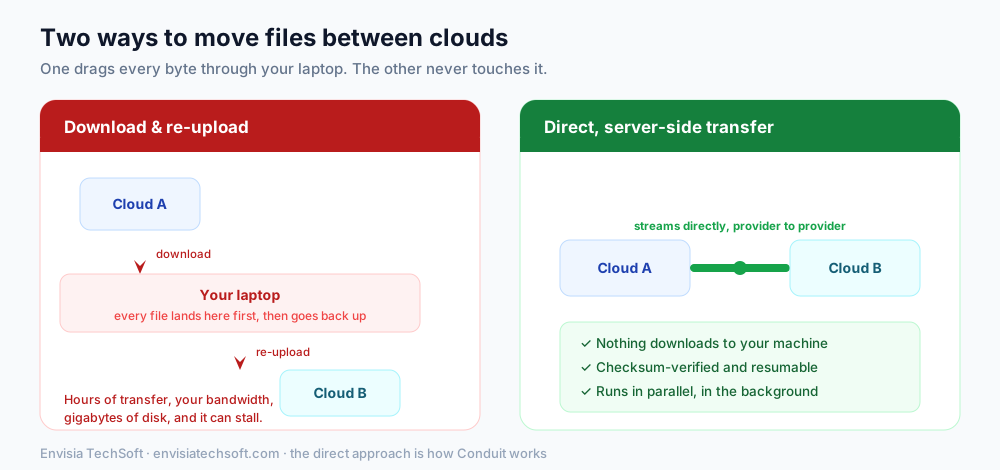
Takeout exports your data, and it is great for getting a backup. But moving to another account means downloading a giant archive to your computer and then uploading it into the new Drive, which is the slow download-and-re-upload trap: your bandwidth, your disk, and hours of waiting, with Google Docs files turned into exported formats along the way.
The Workspace admin transfer tool
If both accounts are inside the same Google Workspace organisation, an admin can transfer ownership in bulk. Useful, but it only works within one Workspace, and only if you are the admin. It does nothing for a personal Gmail to personal Gmail move, or across two different organisations.
rclone
rclone can copy Drive to Drive, and crucially it can do it server-side (Google copies the files internally) rather than routing them through your machine. It is free and excellent, if you are comfortable configuring a command-line tool with two sets of Google credentials.
The trick that makes Drive-to-Drive fast: it stays on Google's side
Here is the key insight that most people miss. A copy from one Google Drive to another Google Drive does not have to travel anywhere. Google can copy the files internally, on its own servers, so the data never comes down to you and goes back up. It is dramatically faster than moving between two different providers, and it costs essentially nothing to perform.
This is exactly how a direct-transfer tool handles it. With Conduit, you connect both Google accounts, pick what to move, and the copy runs server-side between them, with the folder structure preserved and every file verified. And because a Drive-to-Drive copy is server-side and free to run, Conduit does not count it against any usage limit: Google Drive to Google Drive is unlimited on every plan, including the free tier. For this specific job, that makes it both the fastest and the cheapest option.
Here is how the approaches stack up:
| Method | Downloads to your device | Effort | Keeps structure | Cost |
|---|---|---|---|---|
| Share + make a copy | Sometimes | High, manual | Often breaks | Free |
| Google Takeout | Yes, everything | High | Partial | Free |
| Workspace admin tool | No | Low, but admin-only | Yes | Workspace only |
| rclone (server-side) | No | High (CLI setup) | Yes | Free |
| Conduit (Drive to Drive) | No | Low (connect + go) | Yes | Free, unlimited |
Moving your Drive to a new account, step by step
Using a direct transfer, the flow is short:
- Connect the old Google account through Google's consent screen (scoped read access to your Drive).
- Connect the new Google account the same way (write access to its Drive).
- Choose what to move: your whole Drive, or specific folders.
- Start the transfer. It copies server-side, preserves your folder hierarchy, and verifies each file on arrival. You watch it progress and, when it is done, everything is in the new account, organised as it was.
Your Google Docs, Sheets, and Slides come across as native Google files, and your originals stay in the old account until you decide to clean up.
A couple of things to know
- Shared files and shared drives behave differently from files you own. A transfer copies the files you can access; ownership and sharing settings may need a quick review afterward in the new account.
- Verify before you delete. Always confirm the copy is complete and correct in the new account before removing anything from the old one. A verified transfer makes this easy, but the habit is worth keeping.
The bottom line
Google makes moving your own Drive to a new account harder than it should be, and the default answers all involve either endless manual copying or dragging everything through your computer. The shortcut is to let the copy happen where the files already live, on Google's servers, which is fast, keeps your folders intact, and, for a Drive-to-Drive move, is free.
That is the exact use case we built Conduit around, and why Google Drive to Google Drive transfers are unlimited on it, even on the free plan. Connect both accounts, pick your folders, and let it move everything across, verified, without a single file touching your laptop. You can read more about how it works in our Conduit overview.
Sources
Frequently asked questions
- How do I transfer my Google Drive to a new Google account?
- The cleanest way is a direct Drive-to-Drive transfer that runs on Google's servers. You connect both Google accounts, choose what to copy, and the files are copied from the old Drive to the new one without downloading anything. Because a Google Drive to Google Drive copy is server-side, it is fast and does not use your internet connection.
- Can I move Google Drive files to another account without downloading them?
- Yes. A direct cloud-to-cloud transfer copies the files between the two Google accounts on the server side, so nothing downloads to your device. This is much faster and less fragile than exporting everything with Google Takeout and re-uploading it manually.
- Is there a free way to move a Google Drive between accounts?
- Yes. With Conduit, Google Drive to Google Drive transfers are unlimited on every plan, including the free tier, because that kind of copy happens entirely on Google's side and costs nothing to run. Only cross-provider transfers (for example Drive to Amazon S3) count toward a usage limit.
- Will moving my Google Drive keep the folder structure?
- Yes. A proper transfer preserves your folder hierarchy, so files arrive in the new account organised the way they were in the old one, rather than as a flat dump. Google Docs, Sheets, and Slides copy across as native Google files.