If you have ever tried to connect an AI agent to your company's real tools, you have felt the pain the Model Context Protocol was built to solve. You want the agent to read from Google Drive, query your database, and open pull requests on GitHub. So you write a custom integration for Drive. Then a different one for your database. Then another for GitHub. Every tool speaks a different language, each integration is bespoke, and the moment you add a fourth tool or a second AI app, the tangle doubles. It does not scale, and nobody enjoys maintaining it.
MCP is the standard that ends that tangle. The cleanest way to think about it is the one everyone uses: MCP is the USB-C port for AI. Before USB-C, every device had its own connector and you needed a drawer full of cables. USB-C replaced them with one standard socket. MCP does the same thing for AI: instead of a custom integration per tool, every tool and every AI app speaks one shared protocol.
What MCP actually is
MCP is an open standard, introduced by Anthropic in November 2024, that gives AI applications a consistent way to connect to external tools, data sources, and systems. The word "open" matters. It is not an Anthropic product; it is a specification anyone can implement, which is exactly why adoption was so fast. Within months of release, OpenAI, Google DeepMind, and Microsoft had all adopted it, and a large ecosystem of ready-made servers and SDKs grew up around it. When the major labs, who agree on very little, all adopt the same connectivity standard within a year, that standard has effectively won.
How it works: host, client, server
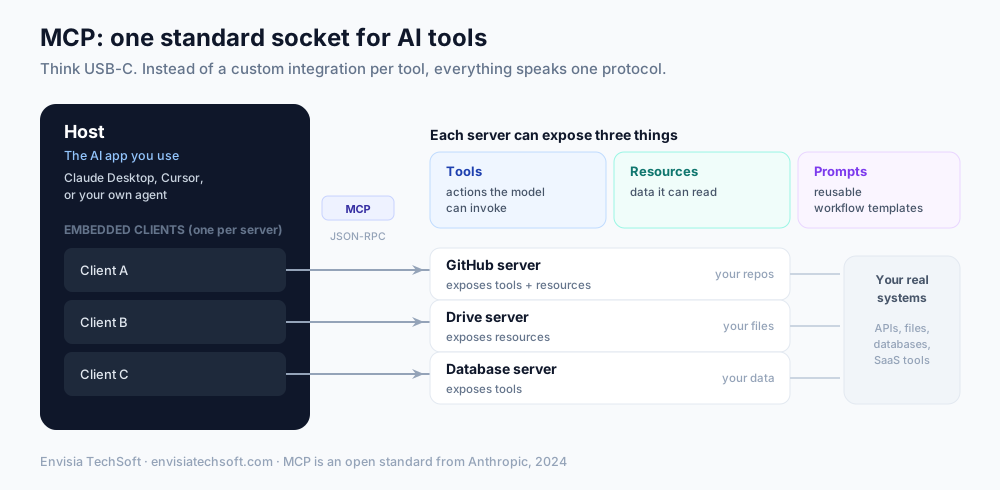
MCP uses a simple client-server architecture with three roles. Getting these three straight is most of understanding MCP.
- The host is the AI-facing application you actually interact with. Claude Desktop, an IDE like Cursor, or a custom agent you built are all hosts. The host is where the model lives and where the user sits.
- The client is embedded inside the host and handles the protocol plumbing. The key detail: the host creates one client for each server it connects to, and each client keeps a stateful, one-to-one connection with its server. Three servers, three clients.
- The server is a lightweight program that exposes specific capabilities. A GitHub server exposes your repositories, a database server exposes your data, a Drive server exposes your files. Servers are small and single-purpose by design.
Under the hood they talk using JSON-RPC 2.0, a standard message format, over one of two transports: STDIO for local servers running on the same machine, and streamable HTTP for remote servers reached over the network. You rarely need to think about the transport; the point is that any compliant host can talk to any compliant server, full stop.
The three things a server can expose
An MCP server can offer up to three kinds of capability, called primitives. This is the vocabulary worth memorising, because it is how you reason about what any server can do.
| Primitive | What it is | Example |
|---|---|---|
| Tools | Actions the model can invoke | Run a database query, send an email, open a PR |
| Resources | Data the model can read | File contents, a record, a document |
| Prompts | Reusable workflow templates | A pre-built "summarise this ticket" flow |
Tools are the ones people talk about most, because they are what let an agent do things rather than just chat. But resources (giving the model clean, structured access to your data) and prompts (packaging a repeatable workflow) are just as much a part of what makes MCP useful.
Why it matters: the N-times-M problem
Here is the real reason MCP took off, stated plainly. Without a standard, connecting M AI applications to N tools means building M times N custom integrations, and every new tool or app multiplies the work. With MCP, you build M plus N: each AI app implements the protocol once, each tool exposes an MCP server once, and any app can talk to any tool for free. A server someone else wrote for Slack works with your agent, with Claude Desktop, and with Cursor, without anyone writing glue code.
That is the network effect that turned MCP from a nice idea into infrastructure. Every server that gets built makes every host more capable, and every host that adopts the protocol makes every server more useful.
The security catch you must know about
MCP is genuinely powerful, and that power cuts both ways. Giving an AI agent a standard, easy way to reach your real tools and data is exactly the setup that makes AI agents risky, and MCP inherits every one of those risks plus a few of its own. Do not connect servers casually.
The specific threats worth knowing:
- Prompt injection and context manipulation. Because an agent reads external content and then decides which tools to call, hidden instructions can steer it into unsafe tool use or data exfiltration. This is prompt injection with a bigger blast radius, because now the agent can act.
- Tool poisoning. A nastier variant: malicious instructions hidden inside a tool's own description or metadata hijack the model's decision-making before the user does anything at all. The agent reads the poisoned tool definition and is compromised on connection.
- The confused deputy problem. An MCP server with broad ambient permissions gets tricked into performing actions the user never authorised, because it holds more authority than any single request should be able to use.
- Token passthrough. Forwarding a credential meant for one system to a downstream tool call lets that credential reach places it was never meant to touch.
None of this means avoid MCP. It means connect deliberately. Apply least privilege so a server can only do what its job requires, require authorization per action rather than granting blanket access, vet where your servers come from, and treat every tool description as untrusted input. The OWASP MCP Top 10, published in 2025, is a solid reference for the full list. This is also why even official servers have shipped vulnerabilities, so "it's from a big name" is not a substitute for scoping permissions tightly.
What this means for you
If you are building anything agentic, MCP is now the default way to give your agent hands. The practical implications:
- You probably don't need to build integrations from scratch. There is likely already an MCP server for the tool you want to connect. Reuse before you build.
- Design your own tools as MCP servers. If you expose your internal systems through MCP, they instantly work with any compliant AI app, now and in the future, instead of being locked to one.
- Make permissions a first-class decision. The convenience of MCP is exactly why scoping what each server can touch is the most important thing you will do. Start from least privilege and add access deliberately.
MCP is one of those quiet standards that reshapes what is possible without much fanfare. It turned "connect an AI to your tools" from a bespoke engineering project into plugging in a cable. The teams that understand it, and wire it up safely, are the ones whose agents will actually be able to do useful work in the real world.
Wiring agents into real systems through MCP, with the right guardrails, is exactly the kind of thing we build and teach. If you are moving from AI demos to agents that touch your actual tools, get in touch.
Sources
Frequently asked questions
- What is the Model Context Protocol (MCP)?
- MCP is an open standard, introduced by Anthropic in November 2024, that gives AI applications a consistent way to connect to external tools, data, and systems. Instead of building a custom integration for every tool, an AI app speaks one protocol to any MCP server. It is often described as the USB-C port for AI.
- How does MCP work?
- MCP uses a host-client-server model. The host is the AI application you use, such as Claude Desktop or an IDE. Inside it, a client maintains a one-to-one connection with each MCP server. A server is a lightweight program that exposes capabilities, and the two communicate using JSON-RPC 2.0 over either a local (STDIO) or remote (HTTP) transport.
- What can an MCP server expose?
- Three things, called primitives. Tools are actions the model can invoke, like querying a database or calling an API. Resources are data the model can read, like file contents or records. Prompts are reusable templates that guide a workflow. A given server can offer any combination of the three.
- Is MCP secure?
- MCP introduces real security risks that you must design around. The main ones are prompt injection and context manipulation, tool poisoning (malicious instructions hidden in a tool's metadata), the confused-deputy problem, and token passthrough issues. Apply least privilege, require authorization per action, vet the servers you connect, and treat MCP tool descriptions as untrusted input. The OWASP MCP Top 10 is a good reference.
- Who supports MCP?
- Adoption was unusually fast. Anthropic introduced MCP in late 2024, and within months it was supported by OpenAI, Google DeepMind, and Microsoft, along with a growing ecosystem of SDKs and pre-built servers. That broad backing is why MCP has become the default connectivity standard for AI applications.