If you've used an AI coding agent for more than a day, you've felt the frustration. It formats code the way it likes rather than the way your team does. It reaches for npm when your repo uses pnpm. It re-derives the same fact about your project it figured out yesterday, because every session starts with a blank slate. You end up typing the same three corrections over and over.
The fix is to write the agent an onboarding guide. In Claude Code, that guide has two parts: a CLAUDE.md file for the things it should always know, and Skills for the procedures it should reach for only when the task calls for them. Get these right and the agent stops being a talented amnesiac and starts behaving like someone who actually works here.
Most people write a bloated CLAUDE.md, cram everything into it, and wonder why the agent ignores half of it. So let's do it properly.
CLAUDE.md: the stuff the agent should always know
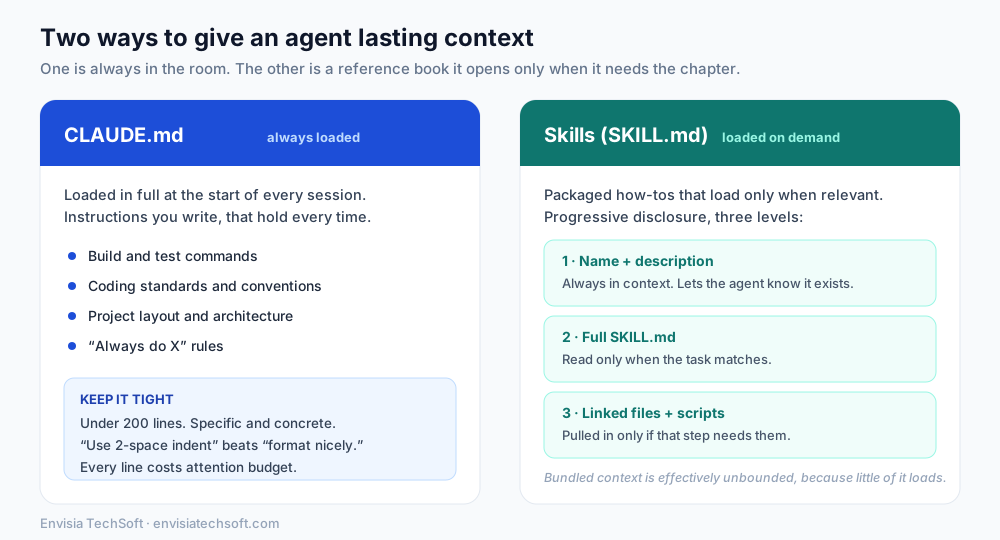
A CLAUDE.md is a plain markdown file that gets loaded, in full, at the start of every session. Whatever you put in it is in front of the agent on turn one, every time. That's its strength and also its cost, and we'll come back to the cost.
Claude Code looks for these files in a few places, from broadest to most specific, and loads all of them by walking up your directory tree:
| Scope | Location | Use it for |
|---|---|---|
| Organisation | Managed policy path (set by IT) | Company-wide standards, security rules |
| User | ~/.claude/CLAUDE.md | Your personal preferences across all projects |
| Project | ./CLAUDE.md or ./.claude/CLAUDE.md | Team-shared, checked into source control |
| Local | ./CLAUDE.local.md (gitignored) | Your private per-project notes |
The project file is the one that matters most for teams, because it lives in version control and everyone shares it. A quick way to bootstrap one is to run /init, which reads your codebase and drafts a starting file with the build commands and conventions it can find. Then you refine from there with the things it couldn't have guessed.
What belongs in it? The facts you'd otherwise re-explain to every new teammate:
- Build and test commands (
npm test,make lint, whatever yours are) - Coding standards and naming conventions
- Where things live: "API handlers live in
src/api/handlers/" - The "always do X" and "never do Y" rules for this codebase
A good rule of thumb from the docs themselves: add to CLAUDE.md whenever the agent makes the same mistake twice, or you catch yourself typing the same correction you typed last session.
Writing instructions the agent will actually follow
Here's the part people skip. A CLAUDE.md is context, not an enforced config file. The agent reads it and tries to comply, but vague or contradictory instructions get followed loosely. How you write it changes how reliably it lands.
Three principles do most of the work:
- Be specific enough to verify. "Use 2-space indentation" beats "format code properly." "Run
npm testbefore committing" beats "test your changes." If you couldn't check whether the rule was followed, the agent can't reliably follow it either. - Use structure. Markdown headers and bullets. The agent scans structure the same way you do, and organised sections beat dense paragraphs.
- Keep it short. Target under 200 lines. This isn't a style nicety. Every line of CLAUDE.md is loaded into the context window on every session, spending the model's limited attention budget. Longer files consume more context and reduce how well the agent follows any single instruction. Less really is more here.
Here's the difference in practice:
| Weak instruction | Strong instruction |
|---|---|
| Format code nicely | Use 2-space indentation; run prettier before commit |
| Test your changes | Run npm test; all tests must pass before a PR |
| Keep files organised | React components go in src/components/, one per file |
| Handle errors well | Use the AppError class; never swallow exceptions silently |
One more trick worth knowing: you can pull in other files with @path/to/file syntax, so a CLAUDE.md can import a README or a shared standards doc instead of duplicating it. Just remember imported files also load at launch, so they count against the same budget.
What does NOT belong in CLAUDE.md
This is where most bloated files go wrong. If something is a long, multi-step procedure, or it only matters for one corner of the codebase, it should not sit in CLAUDE.md eating context on every single session. That's what Skills are for.
Skills: procedures the agent opens only when needed
A Skill is a folder with a SKILL.md file inside it, holding instructions, and optionally scripts and reference files. Think "how we generate the monthly report" or "how we run a database migration." The magic is that skills are not loaded up front. They use a design Anthropic calls progressive disclosure, and it works in three levels:
- Name and description only. At startup, the agent loads just the name and one-line description of every skill into context. That's enough for it to know the skill exists and when it might apply. Cheap.
- The full SKILL.md. The agent reads the whole thing only when it decides the current task actually matches that description.
- Linked files and scripts. Any extra reference material or code loads only if that particular step needs it.
Because almost none of it is in context until it's needed, the amount of detail you can bundle into skills is, in Anthropic's phrasing, effectively unbounded. You can have a hundred skills and pay almost nothing for the ninety-nine you aren't using right now.
The single most important thing about a skill is its description, because that's what the agent uses to decide whether to open it. When a skill isn't triggering, the problem is almost always the description. Write it with the actual words a person would use when they need it. A good SKILL.md starts like this:
---
name: monthly-revenue-report
description: Generate the monthly revenue report from the warehouse. Use when someone asks for the revenue report, month-end numbers, or the finance summary.
---

## Steps
1. Run the query in queries/revenue.sql against the analytics warehouse
2. Format the output using the template in templates/report.md
3. ...
Notice the description lists the trigger phrases: "revenue report," "month-end numbers," "finance summary." That's what makes it fire at the right moment.
CLAUDE.md vs Skills, side by side
The clean way to hold it in your head: CLAUDE.md is the stuff that's true all the time, so it's always in the room. Skills are reference chapters the agent opens only when the task turns to them.
| CLAUDE.md | Skills | |
|---|---|---|
| Loaded | Fully, every session | Name only, then on demand |
| Best for | Standing rules and conventions | Specific, repeatable procedures |
| Cost to context | Pays on every session | Pays only when used |
| Example | "Use pnpm, not npm" | "How to cut a release" |
| Fails when | It gets long and vague | Its description is too fuzzy to trigger |
There's also auto memory, a third mechanism where the agent writes its own notes about your project as it learns your corrections. You don't hand-author that one, but it's worth knowing it exists: CLAUDE.md is what you write, auto memory is what the agent writes, and both load at the start of a session.
A starter template
Here's a lean project CLAUDE.md you can adapt. Notice it's short, specific, and structured, and it leaves procedures to skills.
# Project: Acme API

## Commands
- Install: `pnpm install`
- Test: `pnpm test` (must pass before any PR)
- Lint: `pnpm lint`

## Conventions
- 2-space indentation, TypeScript strict mode
- API handlers live in `src/api/handlers/`, one per route
- Use the `AppError` class for errors; never swallow exceptions

## Rules
- Never commit directly to `main`; open a PR
- Never edit files under `src/generated/` by hand
That's it. It fits on a screen, every line is checkable, and it doesn't try to be a manual.
The takeaway
The teams getting real value out of AI coding tools aren't the ones with the cleverest prompts. They're the ones who invested twenty minutes writing the agent a clear, tight CLAUDE.md and a handful of well-described skills. It's the difference between onboarding a new hire properly and expecting them to read your mind on day one. Write the guide once, keep it lean, and the agent starts getting your project right by default.
Sources
Frequently asked questions
- What is a CLAUDE.md file?
- A CLAUDE.md is a plain markdown file that gives an AI coding agent persistent instructions for a project. It is loaded in full at the start of every session, so whatever you put in it, such as build commands, coding conventions, and project layout, is in front of the agent every time it works on your code.
- What is the difference between CLAUDE.md and skills?
- CLAUDE.md holds standing rules that are true all the time, and it is loaded on every session. Skills are packaged procedures that load only when relevant, through a design called progressive disclosure. Put persistent conventions in CLAUDE.md and specific, repeatable how-tos into skills.
- How long should a CLAUDE.md be?
- Aim for under 200 lines. Because the whole file is loaded into context every session, longer files consume more of the model's attention budget and actually reduce how well it follows any single instruction. Keep it specific, structured, and short, and push multi-step procedures into skills instead.
- Why isn't my skill triggering?
- It is almost always the description. The agent decides whether to open a skill based on its one-line description, so if that description is vague the skill never fires. Write it with the actual words a person would use when they need it, including clear trigger phrases.