Claude Cowork puts an agent on the desktop that can actually do knowledge work: read your files, run scheduled tasks, draft the deck, work the inbox. Anthropic launched it as a preview for Max users in January 2026 and made it generally available on Mac and Windows in April. The capability is real. The reason most team rollouts fizzle is not the tool. It is the setup.
The usual failure looks like this. Someone gets excited, dumps a pile of documents and folders into Claude, writes a giant page of global instructions, and tells the team to go. For a single person it limps along. As the team grows to dozens or hundreds of people, it collapses: folders drift out of date, context leaks between tasks, and nobody knows which file is the source of truth. The mess you had before, now with an AI on top of it.
There is a cleaner way, and it rests on two building blocks and one counterintuitive rule. Let's get into it.
Stop building folders. Build two things.
The single most useful mental shift is to stop thinking in files and folders and start thinking in Skills and Projects. Cowork gives you both as first-class primitives, and almost everything good you can do sits on top of them.
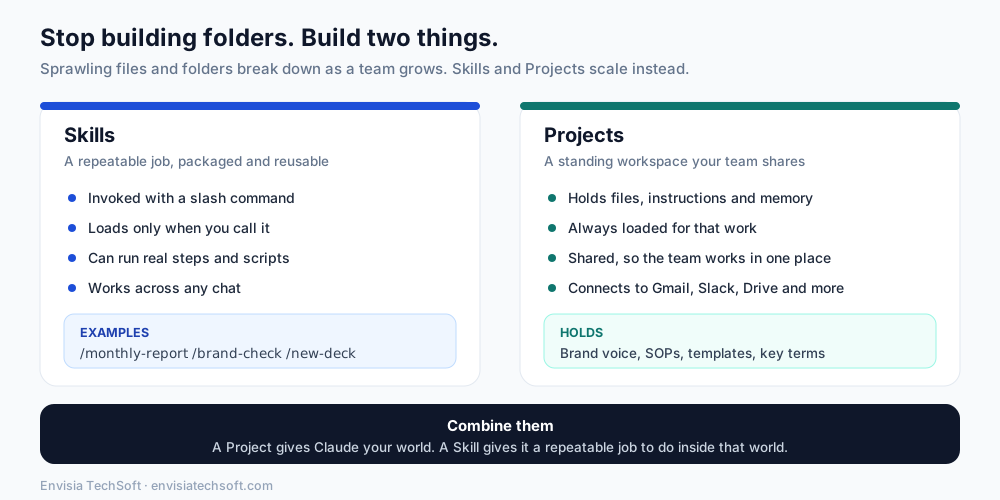
A Skill is a repeatable job, packaged. You invoke it with a slash command, it loads only when you call it, and it can run real steps (Cowork's Skills can even execute scripts, and Anthropic ships pre-built ones for Excel, PowerPoint, Word, and PDF work). Think /monthly-report, /brand-check, /new-deck. A skill is the "how we do this specific thing" captured once so nobody has to re-explain it.
A Project is a standing workspace your team shares. It holds files, instructions, and memory, it stays loaded for that stream of work, and it connects to your tools (Gmail, Slack, Drive, Microsoft 365, and a growing marketplace of others). A Project is the "here is our world" context: brand voice, standard operating procedures, templates, key terminology.
The magic is in combining them. A Project gives Claude your world; a Skill gives it a repeatable job to do inside that world. If you want the fuller mental model of when a standing instruction belongs in one place versus a load-on-demand procedure in another, we wrote about exactly that split for coding agents in CLAUDE.md and skills that actually work. The same logic applies here: persistent context goes in the Project, repeatable procedures become Skills.
Here is the quick sorting rule:
| Put it in a Project when... | Make it a Skill when... |
|---|---|
| It's true all the time (brand voice, SOPs) | It's a specific task you repeat |
| The whole team needs the same context | You want to trigger it on demand |
| It's reference material and templates | It has clear steps, maybe a script |
| It should persist across many chats | It should only load when called |
The counterintuitive part: use less context, not more
Here is the rule that surprises people. When your outputs feel generic, repetitive, or oddly hedged, the instinct is to add more instructions. That usually makes it worse.
An over-stuffed setup, pages of global rules plus every document you own, buries the few things that actually matter under a heap of things that do not. The model spends its limited attention on noise, and you get bland, samey output as a result. Trimming your global instructions down to a handful of high-signal lines, and letting the right Project supply the rest when it's relevant, consistently produces sharper work.
This is not a Cowork quirk. It is the core idea behind context engineering: a model has a finite attention budget, and the goal is the smallest set of high-signal information that gets the right answer, not the largest pile you can assemble. Lean, specific, and relevant beats long, vague, and comprehensive almost every time. So keep your global instructions short and deliberate, and push the detail into Projects and Skills where it loads only when it's needed.
One honest caveat: "less context" is a starting posture, not a dogma. Some tasks genuinely need a lot of grounding, and for those, a well-built Project is exactly where that grounding should live. The point is not to starve the model. It is to stop drowning it in low-value text by default.
The afternoon setup
You do not need a project plan or a developer for this. Five steps get a team most of the way.
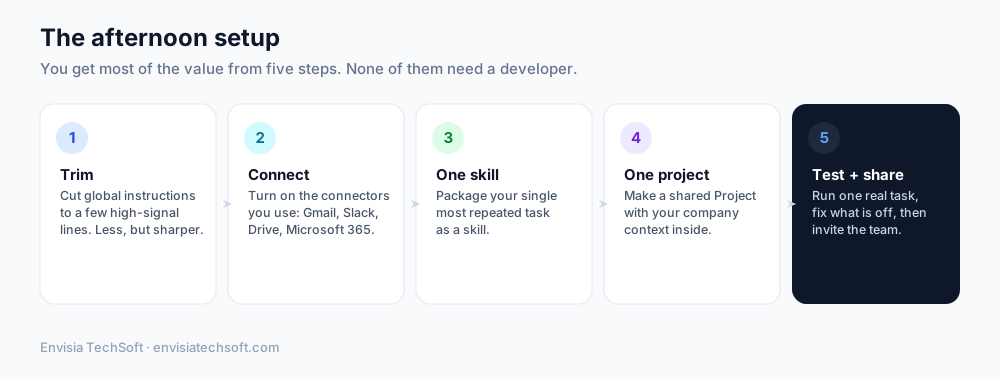
- Trim. Cut your global instructions to a few high-signal lines. Resist the urge to write a manual.
- Connect. Turn on the connectors you actually use, Gmail, Slack, Drive, Microsoft 365, so Claude can reach your real work instead of copy-pasted snippets.
- Make one Skill. Take the single task your team repeats most (the weekly report, the proposal draft, the brand check) and package it as a Skill.
- Make one shared Project. Create a Project with your company context inside: voice guidelines, a few templates, key terms, the SOPs people always ask about.
- Test, then share. Run one real task end to end, fix whatever comes out wrong, and only then invite the team. A setup that works on a real task earns trust. One that half-works kills adoption.
A few working habits worth teaching
The setup gets you started. These habits are what make it stick.
- Ask before you generate. For anything with real stakes, have Claude clarify what you want before it produces a full draft. A short round of "which format, which audience, what to include" up front beats regenerating a long output three times. It is the difference between a tool that guesses and a colleague that checks.
- Talk, don't type, for messy first drafts. Dictating a prompt out loud tends to give Claude far richer context than a terse typed line, because you naturally explain more when you speak. A dictation tool paired with Cowork is a genuinely underrated upgrade.
- Right-size the model. Use a faster model for routine work and reserve the most capable one for genuinely hard problems. Reaching for the heaviest model on every trivial task is slow and wasteful.
Keep the token bill sane
At team scale, careless usage adds up. None of this is exotic; it is just discipline:
| Habit | Why it helps |
|---|---|
| Start a fresh chat instead of long follow-ups | Old conversation piles up as context you keep paying for |
| Batch related tasks into one prompt | One well-scoped request beats ten small round-trips |
| Faster model for routine, top model for hard | You stop paying premium rates for easy work |
| Turn "about me" notes into Skills | Reusable, and not re-sent as context every time |
The theme running through all of it is the same as the context rule: do not carry more than the task needs.
Onboarding: the quietly great use case
One of the best team uses of Cowork has nothing to do with drafting. It is onboarding. Build a shared Project loaded with your company context and pair it with a few Skills, and a new hire can ask Claude how something works, where a template lives, or what the process is for X, and get a real answer instead of interrupting a colleague. They learn to find answers first and ask a human second. For a growing team, that alone can pay for the tool.
How adoption actually spreads
A final, non-technical point that matters more than any setting. Team AI adoption almost never spreads by mandate. It spreads by demonstration. The pattern that works is the champion model: one or two enthusiastic people build workflows that produce visibly better results, other people notice, and they ask how it was done. Your job as a leader is not to force everyone onto the tool on day one. It is to give your champions a clean setup (lean context, a shared Project, a couple of sharp Skills) and let their results do the recruiting.
Get the foundation right, keep the context lean, and let the wins spread on their own. That is how a Cowork rollout goes from a tool a few people poke at to something a whole team actually uses.
(This piece was prompted by a sharp Substack post from Ruben Hassid on rethinking Cowork setup; the take and framing here are our own.)
Sources
Frequently asked questions
- How do I set up Claude Cowork for my team?
- Start small: build two shared things rather than a maze of folders, keep the context you give it lean, and set it up in an afternoon. Then teach a few working habits and let adoption spread from the people who get early wins.
- Why use less context rather than more with Claude Cowork?
- Overloading it with documents and instructions makes responses slower, more expensive, and often worse. Giving it the focused context a task actually needs produces sharper results and keeps your token bill under control. Less but relevant beats more but noisy.
- How does team adoption of AI tools like Claude Cowork actually spread?
- Not by mandate but by visible wins. When a few people use it to do real work faster, others copy them. Onboarding new hires is a particularly strong starting point because the value is obvious and immediate.
- How do I keep AI token costs under control?
- Keep context lean, avoid dumping large documents into every request, and reuse focused setups rather than sprawling ones. Right-sizing what you send is the main lever, and it usually improves quality at the same time as cutting cost.